
Set up a station on site, in any browser
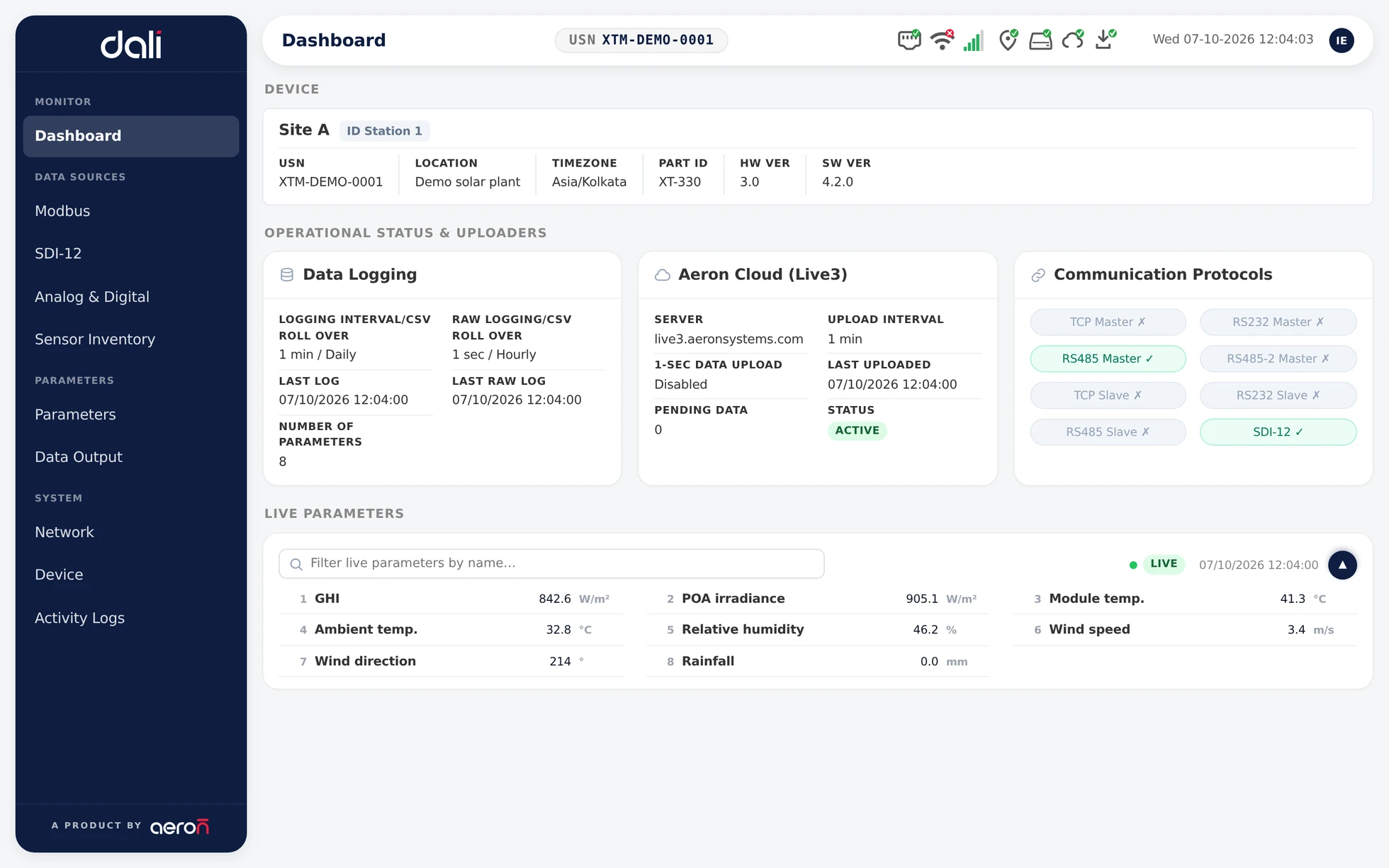
The real DALI dashboard, shown with demo values
In figures
None software to install
The station serves its own console. Open it in any browser.
Offline on site
Measuring, logging and the console keep working with no internet
One place for every input
Modbus, SDI-12, analog and digital sensors, set up side by side
Timed remote support
Aeron support reaches a station only for the time you allow
The station’s own control panel
An Xtreme logger reads field sensors, works out the values you care about, stores them and sends them on. DALI is how you tell it what to do. Your browser talks straight to the station, with no server in between.
See what the station sees
The dashboard shows which station you are on, whether it is logging and uploading, and the latest value of every parameter.
Connect any sensor
Modbus devices over RS-485, RS-232 or TCP, SDI-12 sensors, and analog and digital channels, all set up from the same console.
Name what you measure
Each reading becomes a parameter with a name, a unit and its decimals. Calculated parameters work out values such as dew point on the station itself.
Get data out your way
Download CSV files for any date range, let a SCADA system read the latest values over Modbus, or have the station upload to Live3.
Walk up and connect
Open Live3 Mobile next to a station and it wakes the station over Bluetooth, brings up its hotspot and joins it, with no password to type. It works on a brand-new station that has never been online.
Settings in step with Live3
Change a setting in DALI or in Live3 and the other follows. Every change is kept in a history showing where it came from and when.
Sign in with Live3
Access to a station comes from your Live3 account. Ask for it, an administrator approves it, and it is taken away when someone leaves the team.
Send data anywhere
Minute and one-second data straight from the station to HTTPS webhooks, Azure IoT Hub, AWS IoT Core, MQTT or SFTP, with live delivery status and a backlog that catches up after an outage.
Made for the people at the station
DALI is used where the hardware is: at commissioning, on a service visit, and whenever a station needs a closer look.
Installers
Bring a new station to life: join it to the site network, Wi-Fi or cellular, set up the sensors on the inputs they are wired to, and check the first readings before leaving site.
Field engineers
Add or swap a sensor, adjust scaling and offsets, set the clock from GPS or NTP, and read the activity log to see what changed and when.
O&M teams
Check a station’s health and connections at a glance, pull its data for a date range, and let Aeron support in for a set time when you need help.
From a bare logger to a working station
The same five steps on every site. Each one is a page of the console.
- 1
Reach
Walk up with Live3 Mobile, which wakes the station over Bluetooth, or join the station’s network, and open the console
- 2
Connect
Add Modbus, SDI-12, analog and digital sensors, each on the input it is wired to
- 3
Define
Turn readings into named parameters with units, and add calculated values
- 4
Send
Choose how data leaves: Live3, your own cloud over MQTT, SFTP, Azure or AWS, Modbus for SCADA, or file downloads
- 5
Check
Watch live values on the dashboard and confirm the station is logging before you leave
The station keeps measuring and logging whether or not it has internet. The console does too, so a site with no signal is still a site you can set up.
The console, page by page
Four pages you use on site. These are real DALI screens, shown with demo values.
Dashboard
Which station this is, whether it is logging and uploading, and the latest value of every parameter.
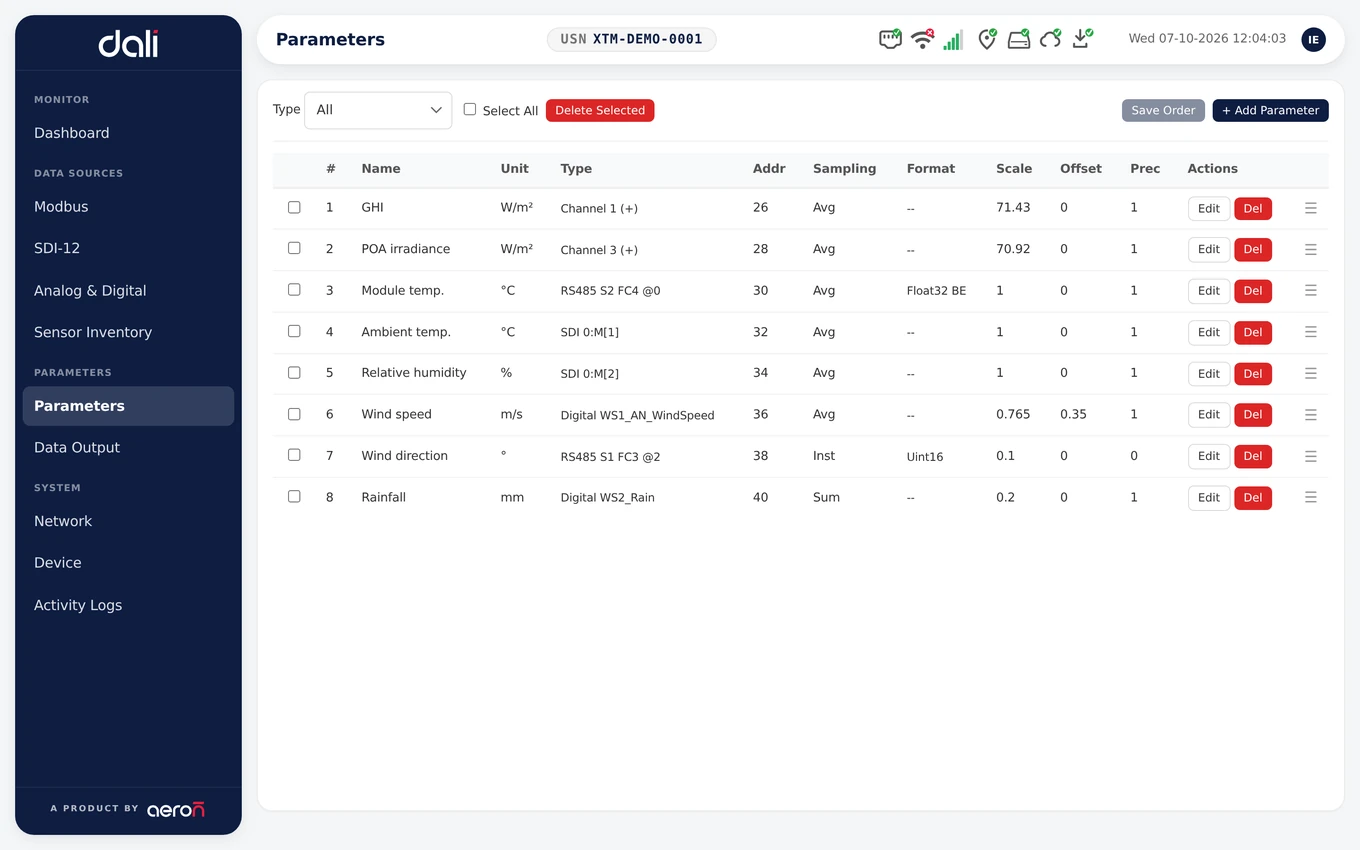
Parameters
Every parameter in order with its source, unit and scaling. The order sets the columns in files and the Modbus registers.
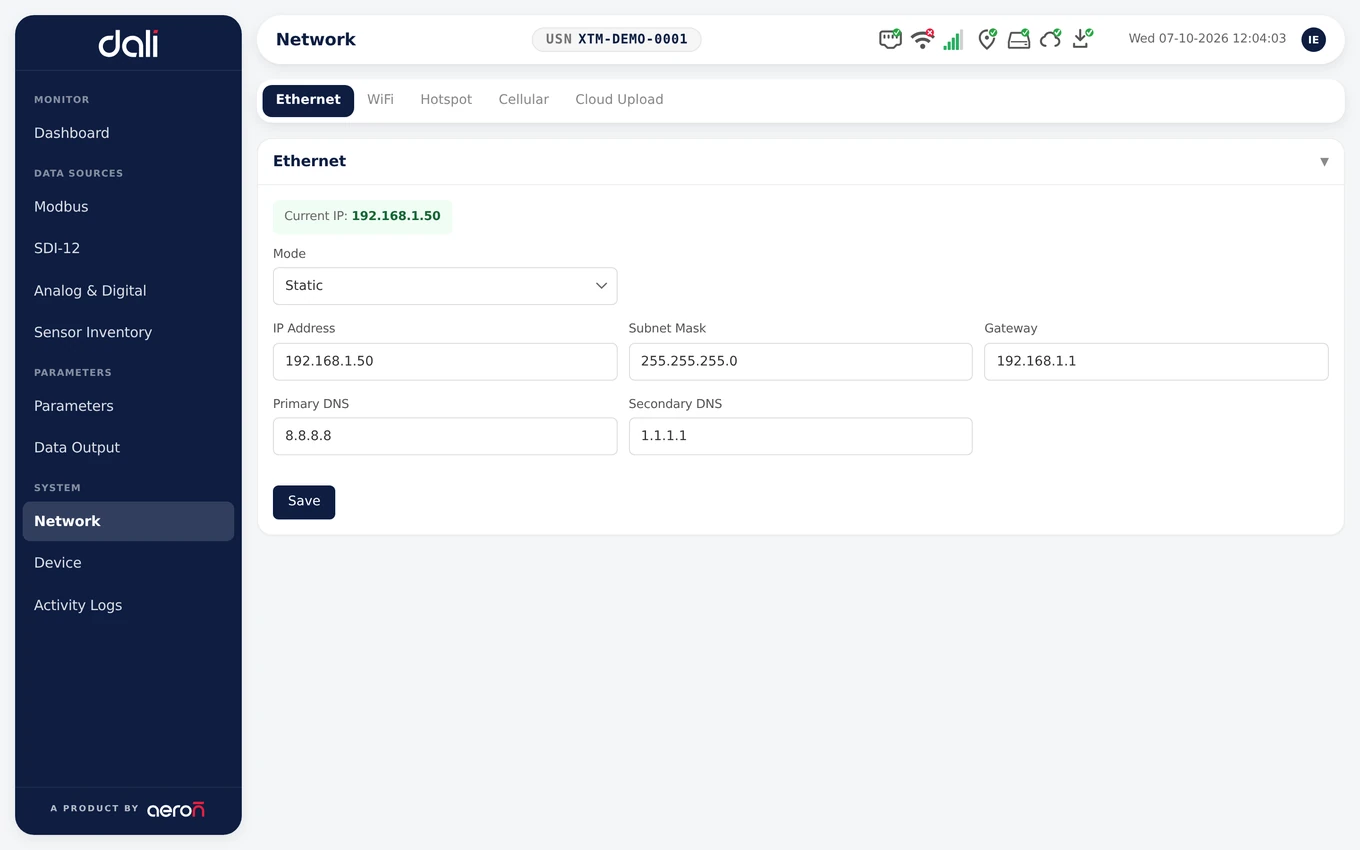
Network
Ethernet, Wi-Fi, cellular and the station’s own hotspot, each on its own tab.
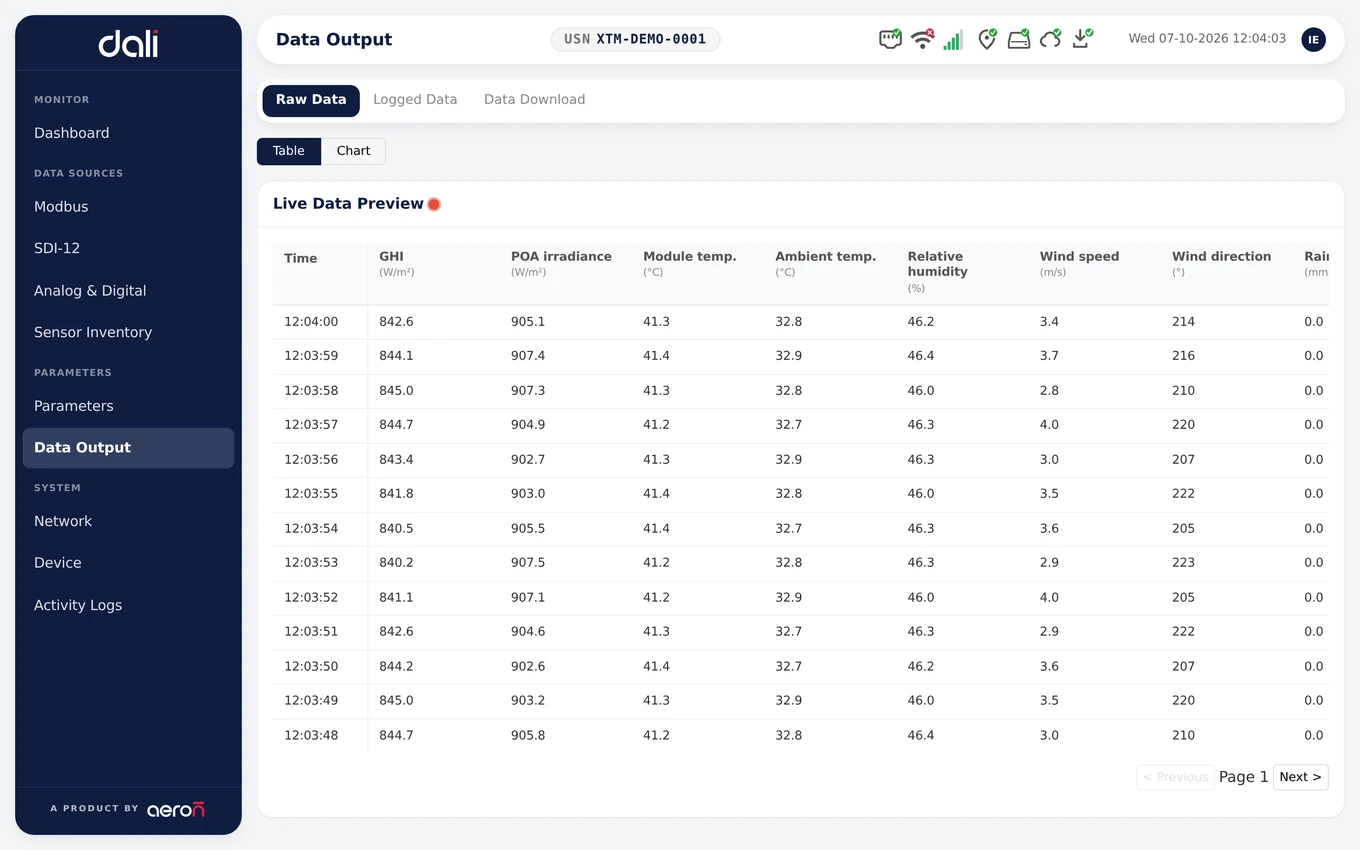
Data output
Live values, logged records, and CSV downloads for the dates you choose.
Xtreme is the hardware. DALI is the software on it.
Sensors wire into the Xtreme logger, DALI sets it up on site, and Live3 is where the data goes next, on the web and on your phone.
- Your sensorsIn the field
- XtremeLogger
- DALIOn the station
- Live3 Web and MobileIn the cloud
- Xtreme Smart Data LoggerThe logger DALI runs on, with analog, SDI-12 and Modbus inputs in one box.See Xtreme
- Live3Once a station uploads, Live3 puts it on a live map and dashboard with alerts and reports, alongside the rest of your fleet.See Live3
- Live3 MobileThe same stations on your phone, with live readings and push alerts, on iOS and Android.See Live3 Mobile
Every page and every job, documented
The DALI guide is public. It walks through the console page by page, with step-by-step guides for signing in, networking, adding sensors and getting data out.
Questions about DALI
Is DALI something I have to install?
No. DALI is built into every Aeron Xtreme data logger and runs on the station itself. You open it in a web browser on a laptop, tablet or phone, and your browser talks straight to the station.
Does DALI need an internet connection?
No. The station measures, logs and serves its console with no internet at all. You only need a connection for the things that leave the station, such as uploads to Live3.
How do I reach a station on a site with no network?
Every station can make its own Wi-Fi network, called the hotspot. Start it at the station, join it from your laptop or phone and open the console in your browser. The guide has the steps: Open the console on site.
Can Aeron support look at my station remotely?
Yes, when you allow it. Remote support is off by default. You turn it on from the console for a time you choose, from 5 minutes to 24 hours, and it closes by itself when the time is up. The station makes an outgoing connection, so nothing has to be opened on your firewall, and every start and stop is written to the station’s activity log.
How does DALI relate to Live3?
DALI sets up and looks after one station, where it stands. Live3 is Aeron’s cloud platform, on the web and in the Live3 Mobile app, where the data from all your stations comes together with maps, alerts and reports. A station set up in DALI uploads its data to Live3, and its settings stay in step both ways: change one in either place and the other follows.
Can I set up a station that has never been online?
Yes. Stand next to it with Live3 Mobile. The app proves who you are to the station over Bluetooth, the station brings up its own Wi-Fi, and the phone joins it and opens DALI. No internet, router or password is needed on site.
How does the station get firmware updates?
Aeron signs every firmware release, and the station checks the signature before it installs anything. Updates reach the station over its internet connection, so there is no site visit.
Where can I read how to use it?
The DALI guide on our documentation site is public. It covers the console page by page, with step-by-step guides for signing in, networking, adding sensors and getting data out.
Contact
Ask for a demo of DALI, or talk to one of our engineers about your stations and your plant.
Sales
Products, quotes and demos
Technical support
Help with an installed product
Careers
Jobs and applications
Offices
India
Head office and design centre, Pune
Plot No. 7, Lane No. 5, Laxman Nagar, Balewadi
Pune, Maharashtra 411045, India
Factory, Pune
Vivan Kohli Industrial Park, Shed No. 5, Gat No. 446
Old Pune-Mumbai Highway, Naigaon, Kanhe Phata, Talegaon
Pune, Maharashtra 412106, India
Sales and support, Bengaluru
First Floor, Building No. 11, Sai Anugraha
Jeevan Bhima Nagar Main Road
Bengaluru, Karnataka 560075, India
Sales and support, Vijayawada
Door No. 52-1/4-8D, Plot No. 9, 5th Cross Road
Veterinary Colony
Vijayawada, Andhra Pradesh 520008, India
International
Aeron Systems Pvt. Ltd., Sharjah
Saif Executive Office # P8-17-02
Sharjah Airport International Free Zone Authority
PO Box 8000, Sharjah, U.A.E.