Live3 Mobile
Live3 on your phone
Free to download. Sign in with your Live3 account.
A closer look
Real screens from the Live3 app on iPhone, showing Aeron's own test stations.
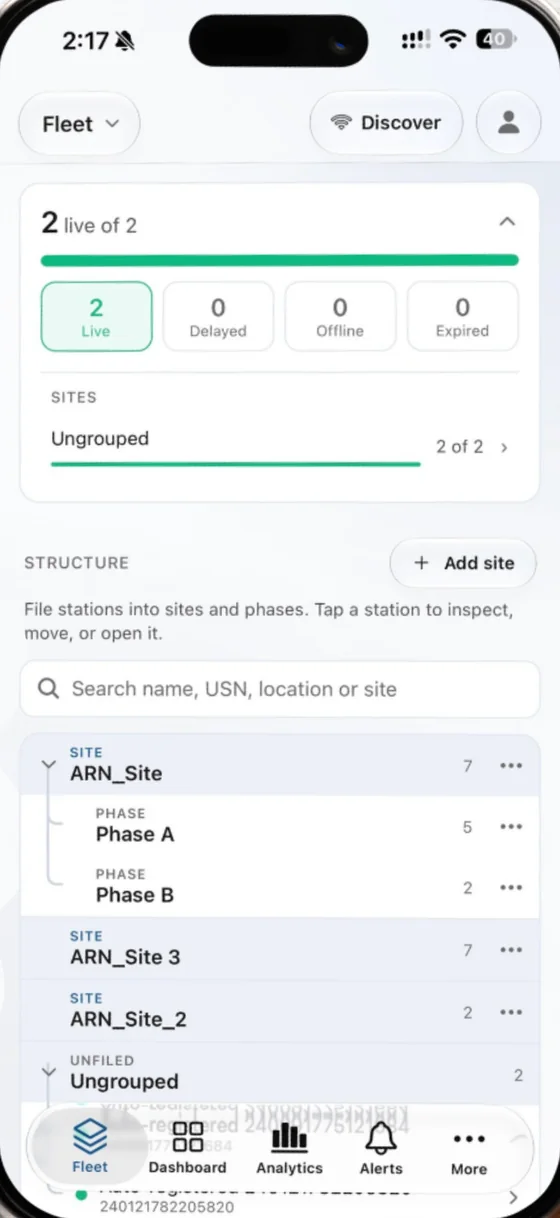
Fleet
Your stations filed into sites and phases, with how many are live, delayed or offline. Tap one to inspect, move or open it.
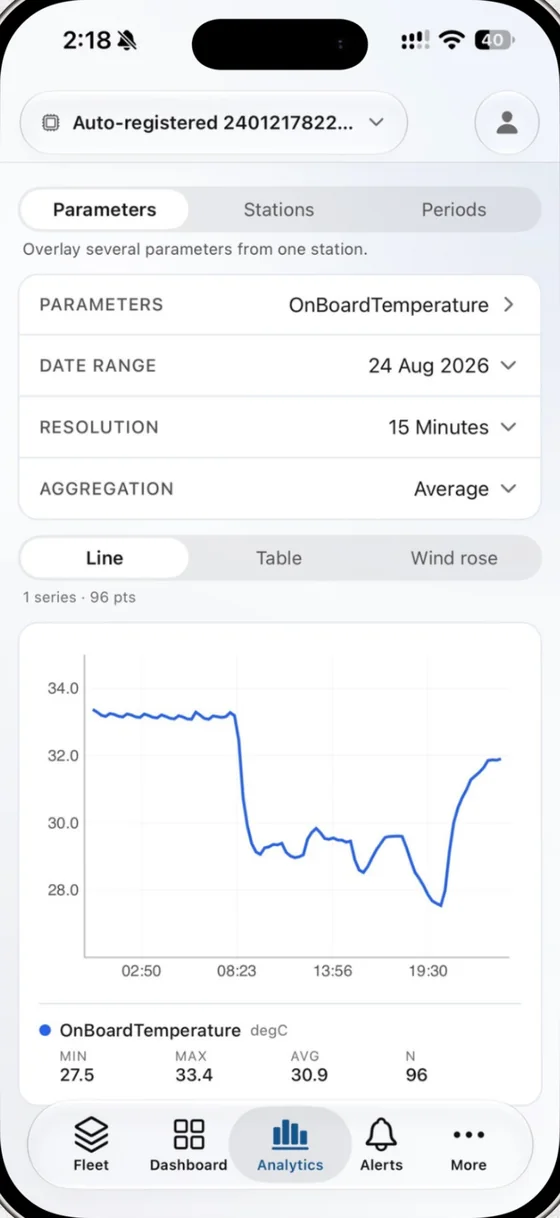
Analytics
Any parameter over any range, with its minimum, maximum and average, read as a line, a table or a wind rose.
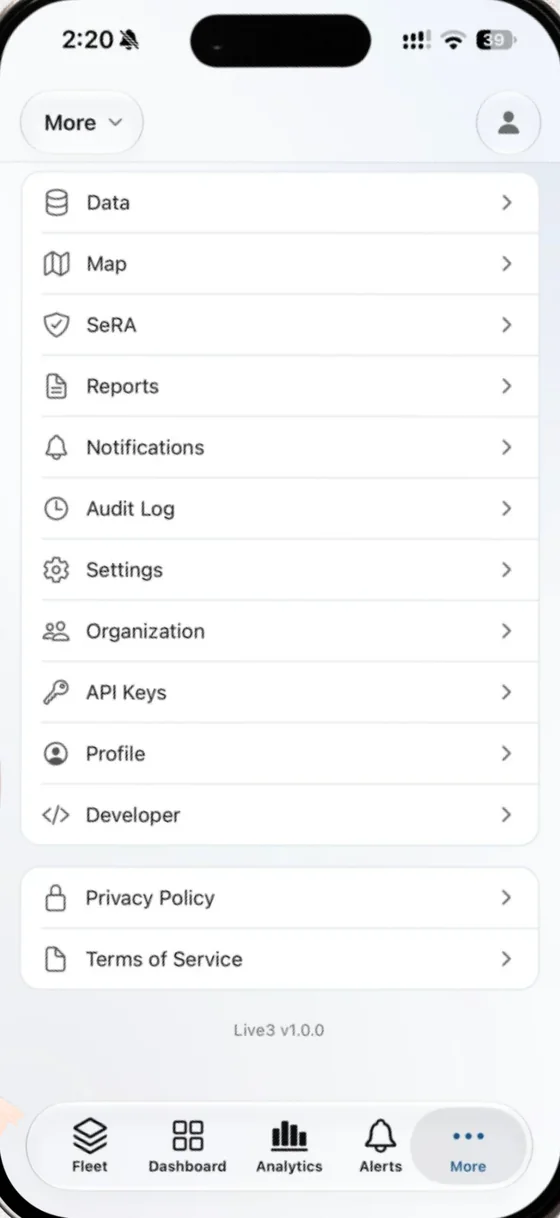
Data, maps and reports
The readings table, the map, SeRA remote access, reports and notifications, plus your organisation, API keys and audit log.
In figures
Live readings
Every station, updated as it reports
Push alerts
On a threshold, or when a station goes quiet
Phone apps
For iPhone and Android, from the App Store and Google Play
One sign-in
The same account and stations as Live3 on the web
Your stations, wherever you are
The four things you open the app for, built for a phone rather than squeezed onto one.
Live readings
Every station on one dashboard: rainfall, temperature, humidity, wind, particulates, gases and whatever else your sensors report, updated as they report it, with how fresh each reading is.
History and charts
Chart any parameter over any range, down to fifteen minute resolution. Overlay parameters, compare stations, set up to four periods side by side, and read it as a line, a table or a wind rose.
Push alerts
Set a threshold on any parameter, or an offline rule for a station that stops reporting, and your phone tells you the moment it trips. See what is firing now and a log of what was sent.
The whole fleet
Browse stations by site or see them all on a map, with battery, signal and last reported time on every row. A station that has gone quiet is obvious before anyone asks.
The rest of Live3, in your pocket
Most of what you do on the web you can do from the app too.
Walk up to a station
Stand next to a station and the app wakes it over Bluetooth, brings up its Wi-Fi and joins it, then opens DALI, the console on the station. It works with no internet, even on a station that has never been online.
Scheduled reports
Create and schedule emailed reports, choose who receives them, see what was sent, and send a test to yourself first.
The readings table
Every reading in a table you can filter and sort, then export as CSV when you need the raw numbers.
Remote access with SeRA
Open a station's DALI page from anywhere, with the owner's consent and a time limit on the session.
Your organisation
Invite colleagues, give them roles, group stations into sites and allocate who sees which station.
API keys and audit log
Issue and revoke API keys for your organisation, and see who changed what, and when.
Station settings
Edit a station's details and its parameters from the phone, with the same names and limits as on the web.
Useful without signal
A screen that had data keeps it when the connection drops, and says it is showing what it last knew.
Locked to you
Sign in with email and password, Google or Apple, and lock the app behind Face ID or your fingerprint.
What changes for your team
Less waiting to find out, less driving to check.
Hear about it first
A station that crosses a limit or stops reporting reaches your phone straight away, not in tomorrow morning's report.
Answer from anywhere
When someone asks how a site is doing, the live value and its history are already in your pocket.
Fewer trips to site
Check a station's readings, health and settings, and open its DALI page through SeRA, before deciding anyone needs to drive out.
One version of the truth
The app reads the same Live3 as the web, so the numbers on a phone and on the office screen always agree.
Part of Live3
One account across the web, the phone and the station.
Questions
Who can use Live3 Mobile?
Anyone with a Live3 account. The app is free to download, and access is set up by your organisation: your administrator decides which stations and pages each person sees. If your organisation is not on Live3 yet, talk to us.
Is it the same as Live3 on the web?
It is the same Live3: the same account, the same stations and the same data. Change a setting on your phone and it is changed on the web too.
Which phones does it run on?
iPhone, from the App Store (iOS 15.1 or later), and Android phones, from Google Play.
How do alerts reach my phone?
Set a threshold on any parameter, or an offline rule for a station that stops reporting, and Live3 sends a push notification to every phone you are signed in on. You choose which kinds of notification you get, and tapping one takes you straight into the app.
What happens when I lose signal?
The app keeps showing what it last loaded and tells you so, instead of an empty screen. It catches up as soon as the connection is back.
How does it work with DALI?
DALI is the console that runs on an Aeron Xtreme station. With SeRA, Live3 Mobile can open a station's DALI page remotely, with the owner's consent and a time limit, so an engineer can check a station without driving to it. More about DALI.
Get Live3 Mobile
Free on iPhone and Android. Sign in with the account you use for Live3 on the web.
No Live3 account yet? Your organisation can start with a demo. Request a demo
Contact
Ask for a demo of Live3 Mobile, or talk to one of our engineers about your stations and your plant.
Sales
Products, quotes and demos
Technical support
Help with an installed product
Careers
Jobs and applications
Offices
India
Head office and design centre, Pune
Plot No. 7, Lane No. 5, Laxman Nagar, Balewadi
Pune, Maharashtra 411045, India
Factory, Pune
Vivan Kohli Industrial Park, Shed No. 5, Gat No. 446
Old Pune-Mumbai Highway, Naigaon, Kanhe Phata, Talegaon
Pune, Maharashtra 412106, India
Sales and support, Bengaluru
First Floor, Building No. 11, Sai Anugraha
Jeevan Bhima Nagar Main Road
Bengaluru, Karnataka 560075, India
Sales and support, Vijayawada
Door No. 52-1/4-8D, Plot No. 9, 5th Cross Road
Veterinary Colony
Vijayawada, Andhra Pradesh 520008, India
International
Aeron Systems Pvt. Ltd., Sharjah
Saif Executive Office # P8-17-02
Sharjah Airport International Free Zone Authority
PO Box 8000, Sharjah, U.A.E.