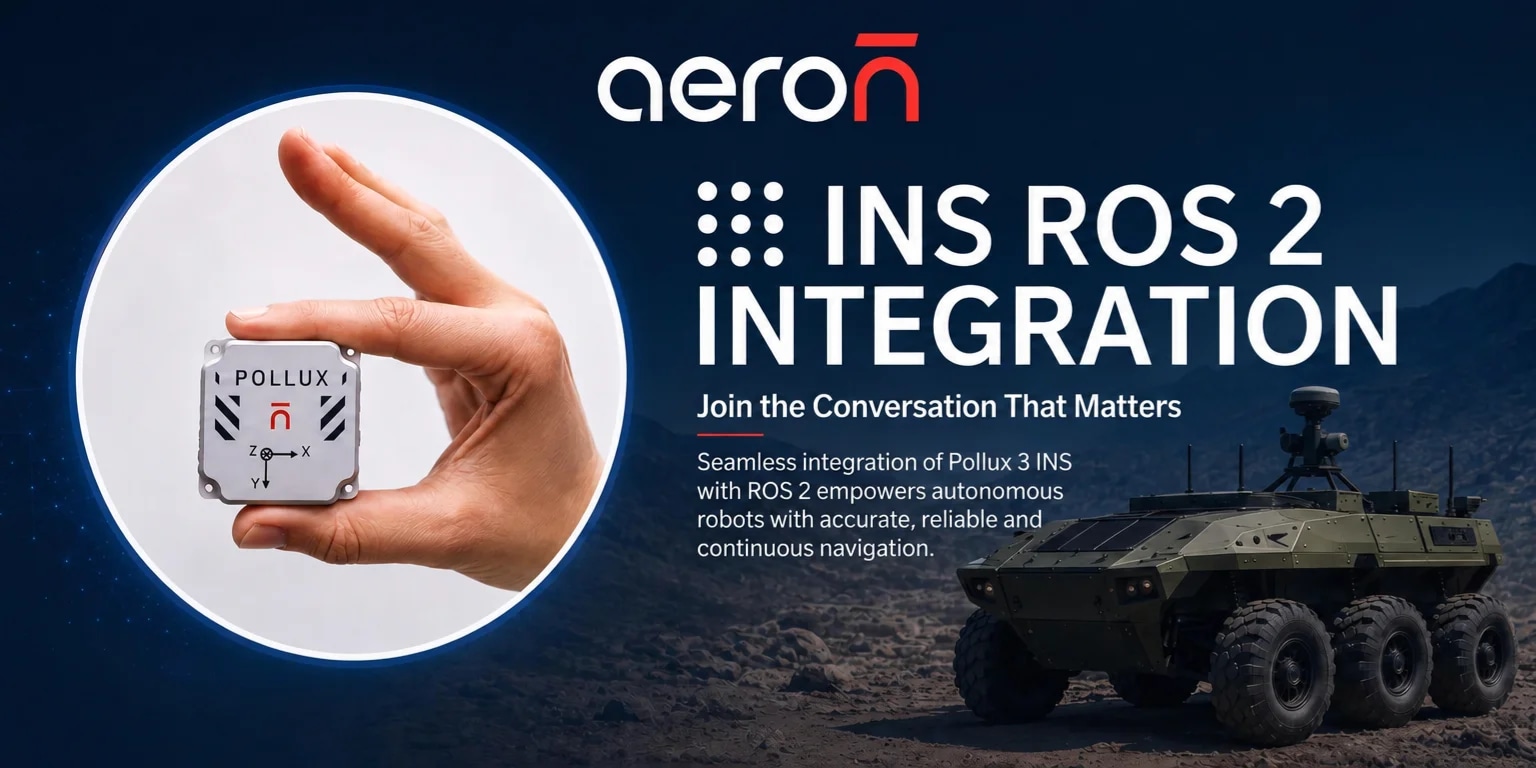
Why INS–ROS2 Integration Is Required for Autonomous Robots?
Autonomous robots need continuous and reliable position, velocity, and attitude information for localisation, trajectory planning, and control. GNSS alone may not provide uninterrupted navigation due to signal blockage, interference, or GNSS-denied environments.
Integrating an INS with ROS2 enables robots to:
Achieve continuous position, velocity, and attitude estimation
Maintain navigation during temporary GNSS outages
Perform dead reckoning in GNSS-denied conditions
Fuse INS data with GNSS, LiDAR, cameras, and odometry
Provide high-rate navigation data to the ROS2 autonomy and control stack
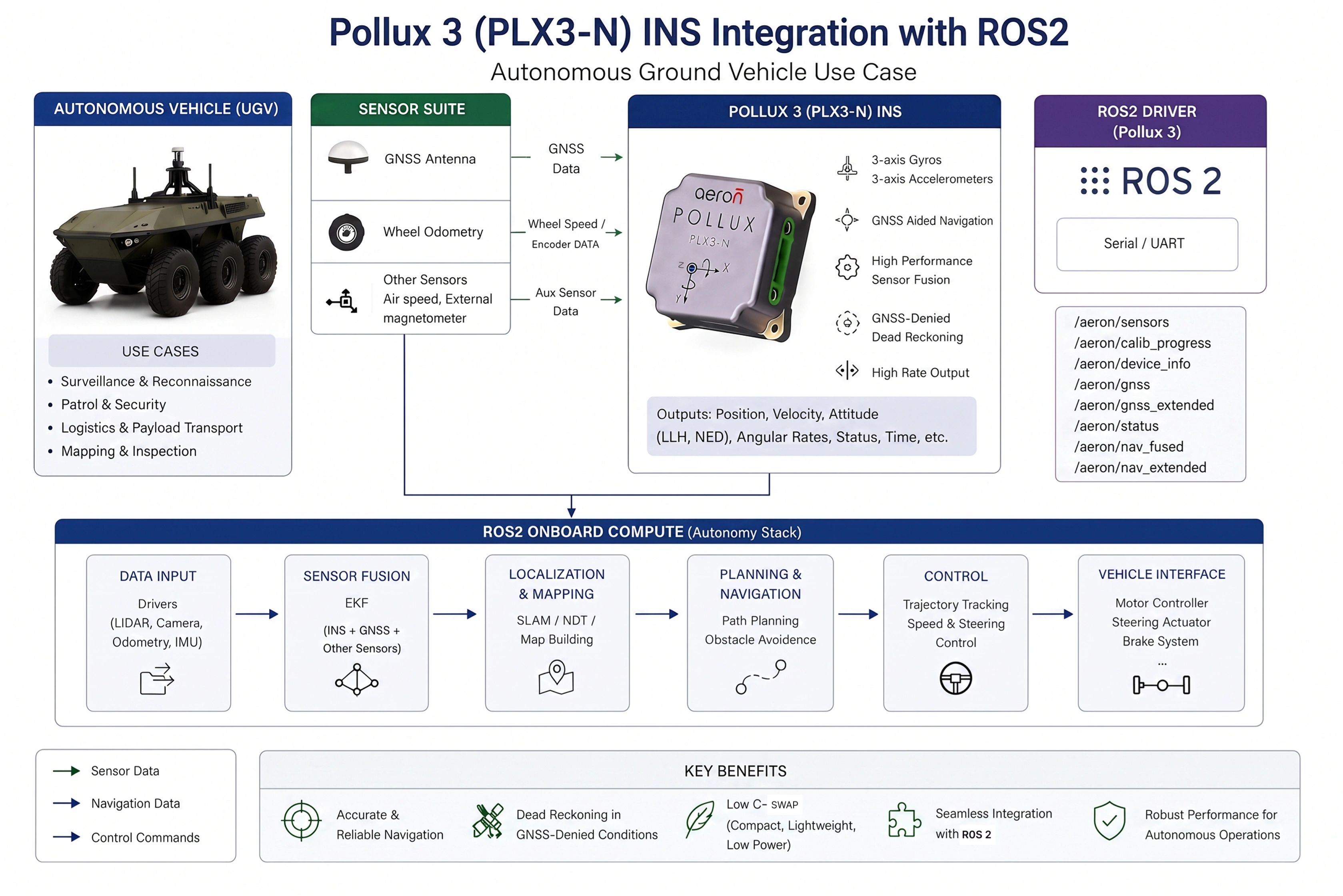
Pollux 3 (PLX3-N) combines very low C-SWaP with high-performance navigation, making it well suited for compact autonomous robotic platforms.
Key capabilities include:
Ultra-miniature, lightweight and low-power design (low SWaP)
High-performance attitude and heading accuracy
Accurate position and velocity estimation
Reliable dead reckoning during GNSS-denied conditions
200 Hz navigation output, up to 1000 Hz IMU data
Dedicated ROS2 driver for simplified integration
Built-in multi-constellation GNSS and EKF-based sensor fusion
Designed for UAVs, UGVs, and robotics
Assured Supply Chain
MIL-qualified / IP65 where relevant
In essence, ROS2 provides the autonomy framework, while Pollux 3 provides the reliable navigation backbone for autonomous robotic platforms.
Why Navigation Accuracy Matters in Autonomous Robotics
Modern autonomous systems rely on multiple sensors for localisation and perception. Cameras, LiDAR and wheel encoders each have limitations.
An Inertial Navigation System bridges these gaps by continuously estimating:
Position
Velocity
Orientation
Angular rate
Acceleration
When GNSS is available, Pollux 3 fuses satellite positioning with inertial measurements through advanced sensor fusion algorithms to deliver smooth, reliable navigation data-even during temporary GNSS outages.
This enables robots to maintain stable localisation in dynamic and challenging environments.
Pollux 3 (PLX3-N) ROS2 Driver
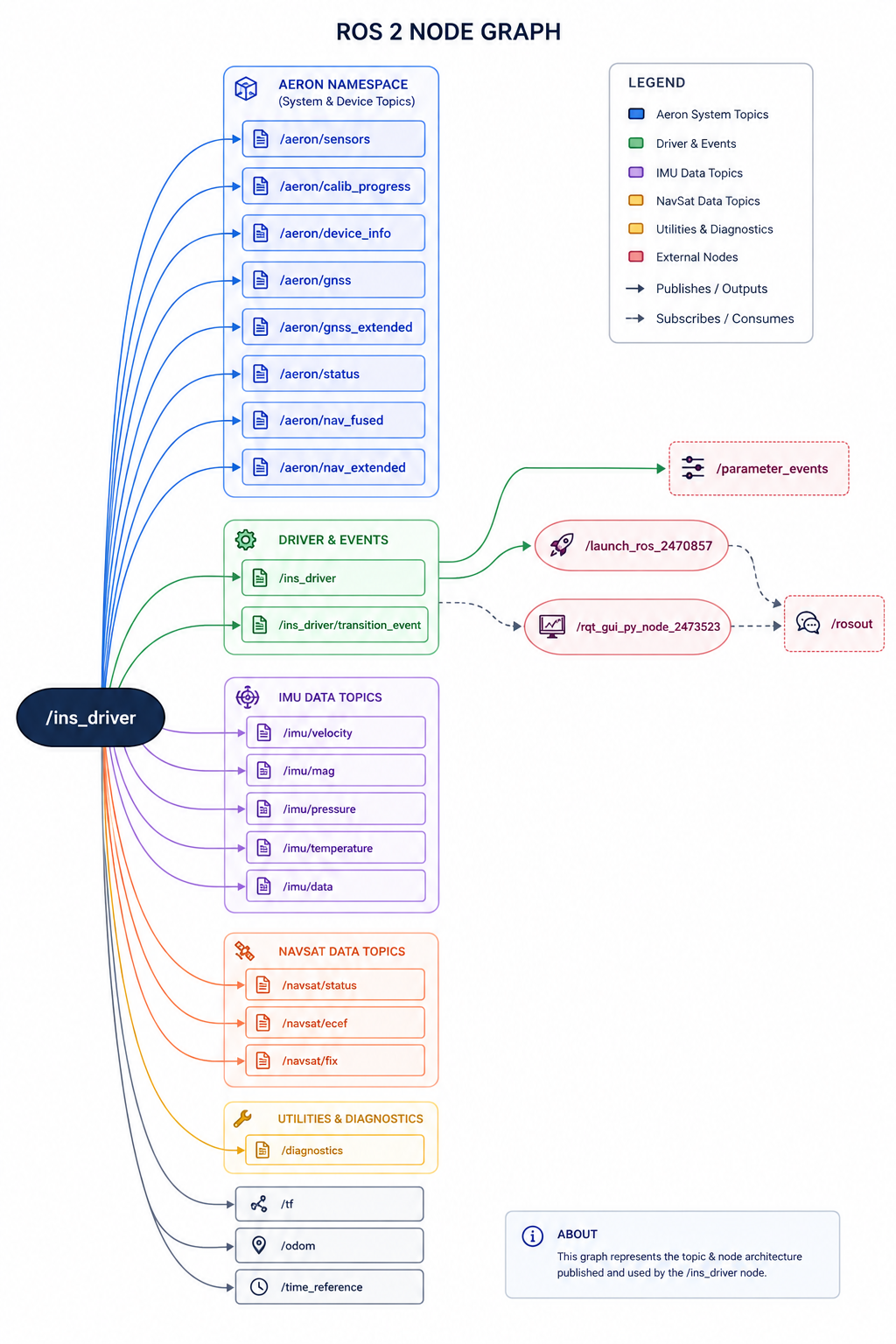
The Pollux 3 ROS2 Driver is designed as a managed lifecycle node and composable component. It publishes REP-103, REP-105 and REP-145 compliant ROS2 topics, enabling compatibility with widely used ROS2 packages without requiring custom middleware. Alongside standard ROS2 topics, the driver also exposes raw Aeron data streams for advanced users and diagnostics.
Key Features
The ROS2 driver offers:
GNSS-aided INS integration
Lifecycle node architecture
Composable ROS2 components
REP-103, REP-105 and REP-145 compliance
Standard and raw ROS2 topics
Configurable Quality of Service (QoS)
Built-in diagnostics and health monitoring
Device calibration services
Static and dynamic TF support
Robust serial communication with automatic reconnection
External Aiding Data through ROS2 node to support onboard aiding.
These capabilities allow developers to integrate the Pollux 3 efficiently into autonomous robotic systems while maintaining reliable data flow and diagnostics.
Compatible with Leading ROS2 Navigation Frameworks
The Pollux 3 ROS2 driver is designed to integrate with commonly used ROS2 navigation frameworks, including:
robot_localization
Nav2
navsat_transform_node
Because the driver adheres to ROS2 REP standards, developers can use these frameworks without additional interface layers, reducing integration time and complexity.
How to Integrate an Inertial Navigation System (INS) with ROS2 for Autonomous Robots?
Developers can quickly integrate the Pollux 3 into a ROS2 workspace using the provided repository structure, sparse checkout workflow and colcon build process. The package supports ROS2 Humble and Jazzy distributions and includes demonstration packages for RViz and Gazebo visualisation.
Real Applications - Pollux 3 is ideal for:
UAV Navigation
Autonomous Ground Vehicles (UGVs)
Autonomous Mobile Robots (AMRs)
Warehouse robots
Mining robots
Defence robots
Agriculture robots
Delivery robots
Inspection robots
Why Robotics Engineers Choose Pollux 3
Pollux 3 combines high-performance inertial navigation with seamless ROS2 integration, enabling engineering teams to accelerate development while maintaining navigation accuracy.
Instead of investing valuable engineering resources in custom sensor integration, developers can deploy a production-ready navigation solution compatible with the broader ROS2 ecosystem.
Whether you're building autonomous robots, UAVs, UGVs or industrial automation systems, Pollux 3 delivers the performance, reliability and flexibility required for next-generation autonomous platforms.
Ready to Accelerate Your ROS2 Development?
Explore how Pollux 3 can simplify navigation integration for your autonomous robotics application.
Next Steps:
Request a live product demonstration.
Download the Pollux 3 datasheet.
Access the ROS2 driver documentation.
Contact Aeron Systems engineering team for integration support.
Aeron Pollux 3 (PLX3-N) — ROS2 Integration Guide
The aeron_pollux_driver package brings the PLX3 Inertial Navigation System into ROS2 as a first-class citizen: standards-compliant sensor topics, a managed lifecycle node, built-in diagnostics, and raw packet access for advanced users. This guide gets you from an unopened box to a PLX3 feeding your navigation stack. For the exhaustive parameter, topic, and service reference, see the full user guide in the repository.
ROS2 distributions | Humble, Jazzy |
Operating system | Linux |
Interface | RS232 / UART, via USB-serial converter |
Node | Managed lifecycle node ins_driver (also loadable as a composable component) |
Frames & units | REP-103/105 (ENU/FLU), REP-145 IMU semantics, SI units |
License | Apache-2.0 |
What you get: standard sensor_msgs/ nav_msgs topics ready for robot_localization, Nav2, and RViz; the full set of raw PLX3 packets republished in wire units for logging and custom estimators; parameter-driven static TF broadcasting for the IMU and GNSS antenna; runtime services for calibration and device control; and eight diagnostic tasks on /diagnostics.
1. Hardware setup
The PLX3 streams over RS232/UART. Connect it to your host through an RS232-to-USB converter it will appear as a serial device, typically /dev/ttyUSB0. Two one-time host steps prevent the most common first-run failures:
Serial permissions. Add your user to the dialout group, then log out and back in:
sudo usermod -aG dialout $USERA stable device name. /dev/ttyUSB* numbering can change across reboots. Pin a fixed name either with the udev rule the package ships (symlinks your converter to /dev/aeron_pollux — best for a deployed robot) or with the kernel's built-in /dev/serial/by-id/... path (no sudo, works under WSL2). The udev rule must match converter's USB IDs, since the PLX3 sits behind it. See the user guide §1.1 for the exact commands.
2. Installation
ARN_DRIVERS is a monorepo, so a sparse checkout pulls just the PLX3 package rather than every Aeron driver:
cd ~/ros2_ws/src

git clone --filter=blob:none --sparse https://github.com/aeron-systems/ARN_DRIVERS.git

cd ARN_DRIVERS

git sparse-checkout set ROS2/pollux3/v01.00/aeron_pollux_driver
colcon recurses through src/ to find the package, so no symlink is needed. Then resolve dependencies and build from the workspace root:
cd ~/ros2_ws

sudo rosdep init      #first time on this machine only (harmless warning if already done)

rosdep update

rosdep install --from-paths src -y --ignore-src

colcon build --packages-up-to aeron_pollux_driver

source install/setup.bash
To update later, git pull inside ARN_DRIVERS refreshes only the checked-out package.
3. Quick start
#Launch (auto-configures+auto-activates)

ros2 launch aeron_pollux_driver aeron_driver.launch.py \

device_path:=/dev/aeron_pollux baud_rate:=921600

#Watch data and confirm health

ros2 topic echo /imu/data

ros2 topic echo /navsat/fix

ros2 topic echo /diagnostics

ros2 run rqt_runtime_monitor rqt_runtime_monitor
If the port doesn't exist or the baud is wrong, the node stays unconfigured and logs why — check the console first.
Output rate is set on the device, not in the driver. Configure the PLX3's per-packet rates in the Aeron Connect Suite GUI before deployment, then set the driver's data_rate_hz to match so the rate diagnostic knows what to expect. For more information refer to AICS section in the PLX3-N INS user manual.
4. The lifecycle node
The driver is a managed lifecycle node — exactly what you want on a robot where an orchestrator decides when sensors come up. It moves unconfigured → inactive → active: configure validates parameters, opens the port, and broadcasts static TFs (no data yet); activate starts the I/O thread and data flows. The bundled launch file does both for you. To drive the transitions yourself (bring-up testing, external orchestration), launch with auto_configure:=false auto_activate:=false and use ros2 lifecycle set /ins_driver <transition>. The node is also registered as a composable component for sharing a process with the rest of your pipeline.
5. What gets published
Standard topics — consumed directly by off-the-shelf ROS2 stacks, all in ENU/FLU and SI units:
/imu/data (sensor_msgs/Imu), /imu/mag, /imu/temperature, /imu/pressure, /imu/velocity (body-frame twist, not GNSS-gated), /navsat/fix and /navsat/status (always RELIABLE so nav stacks never miss a fix), /navsat/ecef, /odom (the PLX3's fused solution), /time_reference, /tf + /tf_static, and /diagnostics.
Raw packet topics — every native PLX3 packet in wire units, for logging and custom estimators: /aeron/nav_fused, /aeron/nav_extended, /aeron/sensors, /aeron/gnss_extended, /aeron/gnss, /aeron/device_info, /aeron/status, /aeron/calib_progress.
The /aeron/* topics use custom aeron_pollux_driver/msg/* types, so source your workspace overlay (source install/setup.bash) before ros2 topic echoing them. The full field-by-field reference and QoS details are in the user guide §6.
The PLX3 outputs calibrated inertial data only — there is no raw-IMU (imu/data_raw) stream.
6. Configuration you must do
All settings are ordinary ROS2 parameters. The durable path is a params YAML passed at launch (params_file:=your.yaml); runtime-changeable parameters can also be set live with ros2 param set. Two things every integrator needs to set.
▸ Mounting transforms
The driver broadcasts two static transforms from your parameters: base_link → imu_link (INS pose) and base_link → gnss_link (antenna lever arm). Offsets are in metres, REP-103 body frame — x forward, y left, z up:
/**:
ros__parameters:
mounting_translation:             # base_link → INS
x:  0.12         #12 cm forward
y: -0.04         #4 cm right (y is left-positive)
z:  0.18         #18 cm up
mounting_rotation:           # only if the INS is physically rotated
roll: 0.0
pitch: 0.0
yaw: 0.0
gnss_mounting_translation:    # base_link → antenna
x: -0.20
y:  0.00
z:  1.20
Verify with ros2 run tf2_ros tf2_echo base_link imu_link. Two rules: these parameters are ROS-side geometry only (never sent to the INS — they tell downstream nodes where the sensors sit), and each physical offset should be applied once — either in the device or in ROS2, never both.
▸ Measurement covariances
The driver ships conservative placeholder covariances — retune them for your platform. A bundled helper captures all sensors while the robot sits still and prints YAML-ready values:
ros2 run aeron_pollux_driver estimate_variances.py 60 > measured_vars.yaml
Use the measured floor directly for gyro/accel/mag. Treat the stationary orientation_variance as a lower bound only — take it from the datasheet or dynamic testing instead. GNSS position covariance needs no tuning: by default the driver fills it live from the PLX3's own reported accuracy.
7. Integrating with your navigation stack
The PLX3 is a full INS: it fuses its inertial and GNSS data onboard and publishes a complete navigation solution. Unlike a bare IMU-plus-GNSS receiver, you don't need a host-side estimator to obtain a pose — the estimation is already done on the device.
▸ Recommended — consume the fused solution directly
Feed /odom into your navigation stack (e.g. Nav2) as the localisation source, and let the driver own the odom → base_link transform:
ros2 param set /ins_driver publish_tf true
/odom publishes a local ENU pose anchored at the first GNSS fix, then continues through subsequent outages via the PLX3's dead-reckoning. It is GNSS-gated: until a first fix is acquired it stays silent (see §5). This is the right path for the large majority of integrations/applications. navsat_transform_node can also consume /navsat/fix directly if you need a georeferenced map frame; it uses the broadcast base_link → gnss_link lever arm to refer the fix to base_link.
▸ Optional — blending with wheel odometry or other local sensors
If your platform has wheel encoders or other local sources you want to combine with the INS, you can run a host-side filter such as robot_localization's ekf_node — note this is a ROS package running on your computer, not a mode on the PLX3. You can also feed external odometer data to the INS directly over Aeron's binary communication protocol. Because the device already outputs a fused solution, treat either path as a deliberate choice rather than the default, and avoid re-fusing information the INS has already fused. A typical wiring feeds the INS orientation/rates/accel and wheel odometry into the filter and keeps the driver's publish_tf at its default false, so the external filter owns odom → base_link:
ekf_filter_node:                      # robot_localization (host-side) — not a PLX3 mode
    ros__parameters:
        imu0: /imu/data
        imu0_config: [false, false, false,       # x, y, z
                      true,  true,  true,        # roll, pitch, yaw
                      false, false, false,       # vx, vy, vz
                      true,  true,  true,        # vroll, vpitch, vyaw
                      true,  true,  true]        # ax, ay, az

      imu0_remove_gravitational_acceleration: true     # PLX3 outputs specific force (REP-145)
Only one publisher may own odom → base_link. If an external filter owns it, keep the driver's publish_tf at false; if the driver owns it, don't run a competing filter. Two publishers on the same transform is a classic TF pathology.
For fully GNSS-denied operation, the INS solution dead-reckons on its own or also fuses external aiding if available; you can also fuse /imu/data and /imu/velocity (neither is GNSS-gated) in your own estimator. Every topic and service name is remappable (--ros-args -r imu/data:=/vehicle/imu, or a remappings=[...] list in your own launch file), and launching with namespace:=<prefix> prefixes everything at once.
8. Calibration & operation
Magnetometer calibration, when the magnetic environment changes:
ros2 service call /calibrate_ins aeron_pollux_driver/srv/CalibrateIns   #START (default)
ros2 topic echo /aeron/calib_progress                                   #rotate slowly about Z
ros2 service call /reboot_device std_srvs/srv/Trigger                   #reboot to apply
The driver auto-stops and auto-saves near 100%; the new coefficients take effect only after the reboot.
Verifying a running driver. /diagnostics is the first place to look when something seems wrong — its eight tasks flag link drops, wrong-baud conditions (bytes arriving but nothing decoding), GNSS degradation, and memory growth. rqt_graph confirms your connections to downstream nodes actually exist.
Stopping cleanly matters. The serial port is a kernel-managed exclusive resource, so stop the driver with a single Ctrl+C in the launch terminal — the lifecycle callbacks close the port and exit cleanly. A second Ctrl+C escalates to SIGTERM, skips the callbacks, and can leave the port locked ("Device or resource busy" on the next launch). The full inspection and shutdown runbook is in operations.md.
9. Troubleshooting
SYMPTOM | FIX |
configure fails with a permission error | User not in dialout — add and re-login (§1). |
Node runs, zero data; Packet Integrity shows ERROR | Baud mismatch. Match rate baud_rate to the device's configured rate. |
rqt_plot / RViz shows nothing | RELIABLE subscriber vs. BEST_EFFORT publisher. Echo with --qos-reliability best_effort, or launch with best_effort_qos:=false. |
No /odom, throttled warning every 10 s | No GNSS fix has anchored the datum yet. Use /imu/data + /imu/velocity or an external EKF for fix-free operation. |
ros2 topic echo /aeron/… → "message type is invalid" | Source the workspace overlay: source install/setup.bash. |
/dev/ttyUSB0 changed number after reboot | Pin a stable name — udev rule /dev/serial/by-id/(§1). |
get_device_info returns success=false | The PLX3 emits its identity once at power-up; call /reboot_device to re-emit it. |
Live ros2 param set rejected | The parameter is configure-time — relaunch with the new value, or cycle the lifecycle. |
10. Reference & support
Full parameter, topic & service reference: user_guide.md
Operator runbook (inspecting & stopping a running driver): operations.md
Source, issues, releases: github.com/aeron-systems/ARN_DRIVERS
Device configuration (output rates, antenna lever arm, heading notation): Aeron Connect Suite
Support: contact Aeron Systems with your driver version, ROS2 distribution, and a /diagnostics capture. The aeron_pollux_driver package is released under the Apache-2.0 license.
Explore the PLX3-N product page to view detailed specifications, key features and integration capabilities, or contact our experts to discuss your application requirements.
Author: Vinayak Pundhir (Embedded Software Developer)